

Carpal tunnel syndrome in gamers develops when repetitive hand movements and prolonged wrist flexion compress the median nerve in the wrist, causing numbness, tingling, and pain. Prevention focuses on ergonomic setup, regular breaks, wrist exercises, and proper posture during gaming sessions. Most gamers should see a doctor if symptoms persist beyond two weeks, worsen at night, or interfere with daily activities, as early intervention prevents permanent nerve damage.
Carpal tunnel syndrome occurs when the median nerve becomes compressed as it passes through the carpal tunnel, a narrow passageway in the wrist formed by bones and the transverse carpal ligament. This compression causes numbness, tingling, pain, and weakness in the thumb, index, middle, and half of the ring finger.
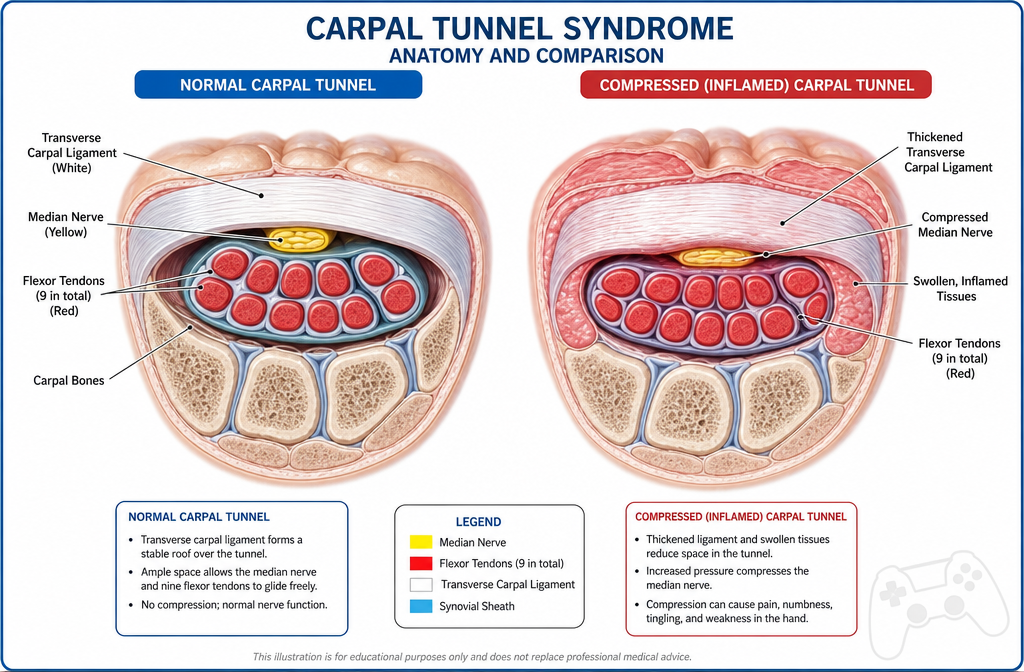
Gamers develop carpal tunnel syndrome because gaming involves specific risk factors that stress the wrist structures:
Repetitive hand movements: Mouse clicking and keyboard tapping create thousands of repetitive motions per gaming session. A typical first-person shooter player performs 300-500 clicks per minute during intense gameplay, translating to 18,000-30,000 repetitive movements per hour.
Sustained wrist flexion: Most gaming setups position the wrist in flexion (bent downward) or extension (bent upward) rather than neutral alignment. This posture narrows the carpal tunnel space and increases pressure on the median nerve.
Grip pressure: Gripping a mouse tightly, especially during competitive play, increases tension in forearm flexor muscles. These muscles share the carpal tunnel with the median nerve, and when they swell from overuse, they compress the nerve.
Extended duration: Gaming sessions lasting 3-8 hours without adequate breaks prevent tissue recovery. The carpal tunnel structures need rest periods to reduce inflammation and restore normal pressure.
Poor ergonomics: Desk height, chair position, and monitor placement that force awkward wrist angles multiply compression forces. A wrist bent 30 degrees from neutral increases carpal tunnel pressure threefold.
The combination of these factors creates a perfect environment for median nerve compression. Unlike office workers who vary their tasks, gamers often maintain identical hand positions for hours, preventing the natural movement variation that protects against repetitive strain injuries.
The earliest symptoms of carpal tunnel syndrome in gamers typically appear as intermittent tingling or numbness in the thumb, index, middle, and ring fingers. These sensations often start during or immediately after gaming sessions and resolve with rest initially.
Nighttime symptoms: The hallmark early sign is waking up at night with numb or tingling hands. This occurs because most people sleep with wrists flexed, which increases carpal tunnel pressure. Gamers often shake their hands or hang them off the bed to relieve symptoms.
Finger-specific numbness: Carpal tunnel affects only the thumb, index, middle, and thumb-side of the ring finger because these are the areas supplied by the median nerve. If the pinky finger is numb, the problem likely involves a different nerve.
Morning stiffness: Hands may feel stiff, swollen, or clumsy upon waking, even without visible swelling. This sensation typically improves within 30-60 minutes of waking and moving the hands.
Weakness during gaming: Difficulty maintaining grip on the mouse or controller, especially during extended sessions. Gamers may notice their aim deteriorating or accidentally dropping items.
Pain radiating up the forearm: Discomfort may extend from the wrist up the forearm toward the elbow. Some gamers also report aching in the palm or base of the thumb.
Symptoms triggered by specific games: Fast-paced games requiring rapid clicking (MOBAs, FPS games) tend to trigger symptoms more quickly than slower-paced strategy or RPG games.
Common mistake: Many gamers dismiss early symptoms as temporary fatigue or "just soreness" from intense gaming. This delay in recognition allows the condition to progress from mild to moderate severity, where conservative treatment becomes less effective.
If you notice these early signs, reduce gaming duration immediately and implement ergonomic changes. Early-stage carpal tunnel responds well to conservative measures, but ignoring symptoms leads to permanent nerve damage. For detailed guidance on recognizing symptoms, see our guide to carpal tunnel prevention.
Wrist exercises and nerve glides help prevent carpal tunnel syndrome by maintaining flexibility, reducing inflammation, and preventing adhesions around the median nerve. Perform these exercises every 30-60 minutes during gaming sessions, holding each stretch for 15-30 seconds.
Wrist flexion and extension stretch: Extend your arm forward with palm facing down. Use your opposite hand to gently pull your fingers back toward your body until you feel a stretch in your forearm. Hold, then flip your palm up and press your fingers down toward the floor. This stretches both flexor and extensor muscles that share the carpal tunnel space.
Median nerve glide: Start with your arm at your side, wrist and fingers curled into a fist. Slowly extend your wrist back, then straighten your fingers, then rotate your forearm so your palm faces up, then gently tilt your head away from your extended arm. Reverse the sequence slowly. This mobilizes the median nerve through its entire path from neck to fingertips.
Wrist circles: Make slow, controlled circles with your wrists in both directions. This maintains range of motion and prevents stiffness. Perform 10 circles clockwise, then 10 counterclockwise.
Finger tendon glides: Start with fingers straight, then bend just the fingertips (hook fist), then make a full fist, then straighten fingers again. This sequence moves the flexor tendons through their full range within the carpal tunnel, preventing adhesions.
Prayer stretch: Place palms together in front of your chest with elbows out to the sides. Slowly lower your hands toward your waist while keeping palms pressed together until you feel a stretch in your wrists and forearms. This stretches the flexor muscles and carpal tunnel structures.
Shake it out: Every 20-30 minutes, shake your hands vigorously for 10-15 seconds as if shaking water off them. This promotes blood flow and reduces muscle tension.
Strengthening exercises: Once flexibility improves, add resistance exercises. Squeeze a soft stress ball for 5 seconds, release, and repeat 10 times. This strengthens grip without excessive strain.
Timing matters: Perform these exercises before gaming (warm-up), every 30-60 minutes during play (maintenance), and after gaming (cool-down). The break itself is as important as the exercises, giving compressed tissues time to recover.
Common mistake: Stretching through pain or performing exercises too aggressively can worsen inflammation. Stretches should feel like gentle tension, never sharp pain. If exercises increase symptoms, reduce intensity or frequency.
For a comprehensive routine with video demonstrations, check out our 10-minute daily carpal tunnel desk exercises and carpal tunnel stretches versus nerve glides comparison.
Both ergonomic and vertical mice can reduce carpal tunnel risk compared to standard mice, but they work through different mechanisms and suit different hand sizes and gaming styles. The best choice depends on your specific wrist position problems and game requirements.
Vertical mice position your hand in a "handshake" orientation, rotating the forearm into a neutral position. This eliminates pronation (palm-down twisting) that compresses the radius and ulna bones together, indirectly increasing carpal tunnel pressure. Vertical mice work best for gamers whose primary issue is forearm pronation strain.
Ergonomic contoured mice maintain a more traditional orientation but add palm support, thumb rests, and finger grooves that promote neutral wrist alignment. These mice reduce wrist extension (bending upward) and ulnar deviation (bending toward the pinky), both of which narrow the carpal tunnel space.
Performance considerations for gaming:
Choosing between them:
Choose a vertical mouse if you experience forearm pain, have limited desk space for arm movement, or primarily play strategy, RPG, or MOBA games where precision is less critical than sustained comfort.
Choose an ergonomic contoured mouse if you play competitive FPS games, need precise aim, or experience wrist extension pain rather than forearm rotation pain.
Size matters: Both types must fit your hand size. A mouse too small forces claw grip with excessive finger flexion. A mouse too large requires overreaching that strains the wrist. Measure from wrist crease to middle fingertip: under 17cm needs small, 17-19cm needs medium, over 19cm needs large.
Common mistake: Buying an ergonomic mouse but maintaining poor desk setup. Mouse design matters less than overall wrist position. If your desk is too high, elbow angle wrong, or armrest positioned poorly, even the best ergonomic mouse cannot prevent carpal tunnel.
The real solution: Proper technique trumps equipment. Keep wrists neutral (straight, not bent up or down), use arm movements rather than wrist flicks for large mouse movements, and maintain relaxed grip pressure. An ergonomic mouse makes proper technique easier but does not replace it.
For more guidance on ergonomic tools, see our article on ergonomic gadgets for preventing carpal tunnel.
No specific hour threshold universally causes carpal tunnel syndrome because individual risk depends on ergonomics, genetics, hand anatomy, gaming intensity, and break frequency. However, research patterns and clinical observations reveal risk zones that help gamers assess their exposure.
Low risk (under 2 hours daily): Casual gamers playing 1-2 hours daily with good ergonomics and varied activities rarely develop carpal tunnel from gaming alone. The wrist structures have adequate recovery time between sessions.
Moderate risk (2-4 hours daily): Gamers in this range begin accumulating repetitive strain, especially if sessions are continuous without breaks. Risk increases significantly if combined with other repetitive hand activities like typing for work or smartphone use.
High risk (4-8 hours daily): Dedicated gamers and streamers in this category show substantially elevated carpal tunnel rates. Without proper ergonomics and regular breaks, symptoms often appear within 6-18 months of sustained play at this level.
Very high risk (over 8 hours daily): Professional esports players and content creators gaming 8-12+ hours daily face the highest risk. Many develop symptoms within their first year of professional play without preventive measures.
Intensity multipliers: The type of gaming matters as much as duration. Games requiring rapid clicking (Starcraft, League of Legends, Counter-Strike) create more repetitive strain per hour than slower-paced games (turn-based strategy, casual puzzle games). A 4-hour MOBA session may create more cumulative stress than 8 hours of a relaxed RPG.
Break frequency: Gaming 6 hours with a 10-minute break every hour carries less risk than 6 continuous hours. Breaks allow tissue pressure to normalize and inflammation to decrease.
Age factor: Younger gamers (teens to early 20s) tolerate longer sessions before symptoms appear because their tissues recover faster. Gamers over 30 develop symptoms more quickly at equivalent exposure levels.
Genetic predisposition: Some people have anatomically smaller carpal tunnels or thicker transverse carpal ligaments, making them more susceptible regardless of gaming duration. If you have family members with carpal tunnel syndrome, your threshold is likely lower.
Decision rule: If you game more than 3 hours daily, implement preventive measures immediately regardless of current symptoms. If you game more than 6 hours daily, consider your wrists an occupational hazard requiring the same preventive care as a professional typist or assembly line worker.
Common mistake: Believing youth or fitness protects against carpal tunnel. Many competitive gamers in their late teens and early 20s develop severe symptoms because they push through early warning signs, assuming their bodies will adapt. Carpal tunnel does not improve with conditioning; it worsens with continued exposure.
Wrist braces can help prevent and manage carpal tunnel syndrome in gamers, but their effectiveness depends on when and how you use them. Braces work by holding the wrist in a neutral position, preventing the flexion and extension that increases carpal tunnel pressure.
Nighttime use (highly effective): Wearing a wrist brace while sleeping prevents the wrist flexion that occurs naturally during sleep. This is the most evidence-supported use of braces for carpal tunnel. Most people sleep with wrists curled, which increases carpal tunnel pressure and causes the characteristic nighttime numbness. A rigid night splint keeps the wrist straight, reducing pressure by approximately 30-40%. Wear the brace every night if you experience nighttime symptoms.
Daytime use during gaming (limited effectiveness): Wearing a brace while gaming is controversial and often counterproductive. While the brace maintains neutral wrist position, it also restricts movement and can cause muscle atrophy with prolonged use. Additionally, the bulk of a brace interferes with mouse and keyboard use, forcing awkward compensatory movements.
When daytime bracing helps: If you have acute carpal tunnel flare-ups with significant pain and inflammation, wearing a brace for 1-2 weeks during all activities (including gaming) can reduce inflammation and allow healing. This is a short-term intervention, not a long-term solution.
When daytime bracing hurts: Using a brace as a "preventive" measure during gaming without symptoms can weaken wrist stabilizer muscles, making you more dependent on the brace and more vulnerable when not wearing it. The brace becomes a crutch rather than a treatment.
Brace selection matters:
The right approach: Use wrist braces at night consistently if you have symptoms. Use them during the day only during acute flare-ups for 1-2 weeks maximum. Do not use them as a substitute for proper ergonomics, breaks, and exercises.
Common mistake: Relying on a wrist brace while continuing poor gaming habits. The brace addresses symptoms but not the underlying cause. If you need a brace to game comfortably, your setup or technique needs correction.
For detailed guidance on selecting the right brace, see our guide to choosing carpal tunnel braces and splints and comparison of day versus night braces.
See a doctor for wrist pain from gaming if symptoms persist beyond two weeks despite rest and ergonomic changes, worsen progressively, or interfere with daily activities beyond gaming. Early medical evaluation prevents permanent nerve damage that can occur with prolonged median nerve compression.
Immediate medical attention (within 1-3 days):
Scheduled appointment (within 1-2 weeks):
What to expect at the appointment:
Your doctor will perform a physical examination including Tinel's sign (tapping over the carpal tunnel) and Phalen's test (holding wrists in flexion for 60 seconds). These tests reproduce symptoms if carpal tunnel is present.
Nerve conduction studies: If diagnosis is unclear or surgery is being considered, your doctor may order nerve conduction velocity (NCV) and electromyography (EMG) tests. These measure how quickly electrical signals travel through the median nerve and whether muscle damage has occurred. The tests take 30-45 minutes and involve small electrical shocks and needle electrodes.
Severity classification:
Treatment escalation: Mild cases receive conservative treatment (splinting, exercises, activity modification). Moderate cases may receive corticosteroid injections. Severe cases typically require surgical release to prevent permanent damage.
Common mistake: Waiting until symptoms become severe before seeking help. Mild to moderate carpal tunnel responds well to conservative treatment, but severe cases with muscle wasting often have permanent weakness even after successful surgery. Early intervention preserves nerve function.
Decision rule: If you are asking yourself whether you should see a doctor, the answer is probably yes. Carpal tunnel syndrome does not improve on its own without addressing the underlying cause, and early treatment is far more effective than late intervention.
For expert evaluation and treatment, consider consulting with board-certified surgeons specializing in carpal tunnel.
Carpal tunnel syndrome and wrist tendonitis (tendinitis) both cause wrist and hand pain in gamers, but they involve different structures and require different treatments. Distinguishing between them is essential for effective management.
Carpal tunnel syndrome results from median nerve compression in the carpal tunnel. Tendonitis results from inflammation of the tendons that move the fingers and wrist, most commonly the flexor tendons or extensor tendons.
Key differences:
FeatureCarpal Tunnel SyndromeWrist TendonitisPrimary symptomNumbness and tinglingPain and achingLocationThumb, index, middle, half of ring fingerWrist, forearm, sometimes fingersNighttime symptomsWakes you from sleep with numbnessMay ache at night but rarely wakes youWeakness patternThumb weakness, difficulty with pinch gripPain with movement, strength often normalAffected by positionWorse with wrist flexion/extensionWorse with specific movements (clicking, gripping)SwellingNo visible swellingMay have visible swelling along tendon pathTinel's signPositive (tapping wrist causes tingling)NegativePain with resistanceUsually no pain, just weaknessSharp pain with resisted movement
Specific tests to differentiate:
For carpal tunnel: Phalen's test (hold wrists in full flexion for 60 seconds) reproduces numbness and tingling. Tinel's sign (tapping over the carpal tunnel at the wrist crease) causes electric shock sensation into fingers.
For tendonitis: Pain with resisted finger or wrist movement. For example, if extending your fingers against resistance causes sharp wrist pain, you likely have extensor tendonitis. Palpating along the tendon path reveals tender spots.
Finger-specific clues: Carpal tunnel affects only thumb through half of ring finger because these are median nerve territory. If your pinky is numb or painful, it is not carpal tunnel (likely ulnar nerve or tendonitis). If only one or two fingers hurt with movement, suspect tendonitis of specific tendons.
You can have both: Gamers frequently develop both conditions simultaneously because the same repetitive movements that compress the median nerve also inflame tendons. If you have numbness plus pain with movement, you may need treatment for both.
Treatment differences: Carpal tunnel responds to wrist splinting in neutral position, nerve glides, and reducing compression. Tendonitis responds to rest, ice, anti-inflammatory measures, and eccentric strengthening exercises. Using the wrong treatment can worsen symptoms.
Common mistake: Assuming all wrist pain is carpal tunnel. Many gamers self-diagnose carpal tunnel when they actually have tendonitis, leading to ineffective treatment. If splinting and nerve glides do not help within 2-3 weeks, reconsider the diagnosis.
For a detailed comparison of these and other conditions, see our guide to carpal tunnel versus tendonitis and carpal tunnel versus other conditions.
Mild to moderate carpal tunnel syndrome can improve with conservative treatment and activity modification, but it rarely resolves completely without addressing the underlying cause. Severe carpal tunnel with muscle wasting or constant numbness typically requires surgery to prevent permanent nerve damage.
When conservative treatment works: Early-stage carpal tunnel with intermittent symptoms, no weakness, and no muscle atrophy responds well to non-surgical management. Success rates for conservative treatment range from 40-70% for mild cases, meaning symptoms improve enough that surgery is not needed.
Conservative treatment components:
Timeline for improvement: If conservative treatment will work, you should notice improvement within 4-6 weeks. Symptoms may not disappear completely but should decrease in frequency and intensity. Full resolution, if it occurs, typically takes 3-6 months.
When conservative treatment fails: Moderate to severe carpal tunnel, symptoms lasting over 6 months, progressive worsening despite treatment, or any muscle wasting indicates conservative treatment is unlikely to succeed. Continuing non-surgical management in these cases risks permanent nerve damage.
The natural history without treatment: Untreated carpal tunnel syndrome typically worsens over time. The median nerve sustains progressive damage from chronic compression, leading to permanent numbness, weakness, and muscle atrophy. Some people experience temporary symptom fluctuation, but true spontaneous resolution is rare.
Pregnancy exception: Carpal tunnel syndrome that develops during pregnancy often resolves spontaneously after delivery as fluid retention decreases. Pregnant gamers should use conservative treatment and avoid surgery unless symptoms are severe.
Age considerations: Younger gamers (under 30) with mild symptoms and excellent compliance with ergonomic changes have the best chance of avoiding surgery. Older gamers or those with anatomically small carpal tunnels are more likely to need surgical intervention.
Decision rule: Try conservative treatment for 6-8 weeks if symptoms are mild to moderate. If symptoms do not improve significantly, or if they worsen at any point, consult a surgeon. Do not wait for muscle wasting to develop, as this indicates irreversible nerve damage.
Common mistake: Continuing conservative treatment indefinitely despite lack of improvement. Some gamers avoid surgery for years while their condition worsens, then discover that surgery cannot fully restore function because permanent nerve damage has occurred.
For more information on whether carpal tunnel can resolve without intervention, see our article on whether carpal tunnel can go away on its own.
Carpal tunnel release surgery involves cutting the transverse carpal ligament to relieve pressure on the median nerve. The procedure takes 15-20 minutes, is performed under local anesthesia, and has a success rate exceeding 90% for symptom relief.
Surgical techniques:
Open carpal tunnel release: The surgeon makes a 2-3 cm incision in the palm, visualizes the transverse carpal ligament directly, and cuts it completely. This traditional approach allows direct visualization and complete release.
Endoscopic carpal tunnel release: The surgeon makes one or two small incisions (about 1 cm) and uses a tiny camera and specialized instruments to cut the ligament. This technique results in less scarring and potentially faster recovery but requires specialized equipment and training.
Both techniques are equally effective for relieving symptoms. The choice depends on surgeon preference, patient anatomy, and whether other procedures (like tendon repair) are needed simultaneously.
The procedure step-by-step:
Immediate post-operative period:
Recovery timeline for gamers:
Return to competitive gaming: Professional gamers typically need 8-12 weeks before returning to competitive play. Rushing return risks re-injury and prolonged recovery.
Success rates and outcomes: Over 90% of patients report significant symptom improvement. Numbness and tingling typically resolve within days to weeks. Weakness and muscle atrophy (if present before surgery) improve more slowly over 3-6 months. Severe pre-operative muscle wasting may not fully recover.
Complications (rare): Infection (under 1%), nerve damage (under 1%), incomplete release requiring revision surgery (2-3%), pillar pain (tenderness at the base of the thumb and pinky, usually resolves in 2-3 months), scar sensitivity.
Common mistake: Returning to full gaming activity too quickly. The transverse carpal ligament heals in a lengthened position over 6-8 weeks. Excessive stress during this period can cause pain, inflammation, and potentially compromise the surgical result.
For detailed information about carpal tunnel surgery and recovery, visit our carpal tunnel surgery recovery guide and time off work after surgery.
Professional esports players face significantly elevated carpal tunnel risk compared to casual gamers due to extreme practice volumes, high-intensity gameplay, competitive pressure that discourages breaks, and often inadequate injury prevention protocols. Many professional players develop symptoms within their first 1-2 years of competitive play.
Risk factors specific to professional gaming:
Extreme duration: Professional players typically practice 8-12 hours daily, six days per week. This volume far exceeds the threshold where carpal tunnel risk increases substantially. Some players during tournament preparation practice 14-16 hours daily.
High intensity: Professional play requires maximum speed and precision constantly. A professional Starcraft player may perform 300-400 actions per minute for hours, creating extreme repetitive stress. Casual players rarely sustain this intensity.
Limited breaks: Competitive pressure and team practice schedules often prevent adequate rest. Players may take only brief bathroom breaks during 6-8 hour practice blocks.
Young age of onset: Most professional players begin intensive training in their mid-to-late teens. Starting repetitive stress at this age, before musculoskeletal maturity, may increase long-term injury risk.
Career pressure: Professional players often ignore early symptoms because acknowledging injury might jeopardize their position on a team or tournament participation. This delay allows mild carpal tunnel to progress to moderate or severe.
Inadequate medical support: Many esports organizations lack dedicated medical staff or injury prevention programs. Players may not receive proper ergonomic assessment, preventive exercises, or early intervention.
Documented cases: Several high-profile professional players have publicly discussed carpal tunnel and other wrist injuries forcing temporary or permanent retirement. These cases highlight the occupational hazard nature of professional gaming.
Prevention in professional settings:
Progressive organizations implement comprehensive injury prevention programs including:
Career longevity: Professional gamers with proper injury prevention and early intervention for symptoms can maintain careers into their late 20s and early 30s. Those without preventive measures often experience career-ending injuries by their mid-20s.
Comparison to traditional athletes: Professional gamers face injury rates comparable to traditional athletes in repetitive motion sports like tennis or baseball pitching. The difference is that traditional sports have decades of established injury prevention protocols, while esports is still developing these standards.
Decision rule for aspiring professionals: If you are pursuing professional gaming, treat your wrists as a professional athlete treats their primary joints. Implement prevention strategies before symptoms appear, not after. Your career longevity depends on it.
Gamers frequently develop carpal tunnel syndrome and other wrist injuries through preventable setup and technique errors. Recognizing and correcting these mistakes significantly reduces injury risk.
Desk too high or too low: When the desk height is wrong, your elbows cannot rest at 90 degrees with shoulders relaxed. A desk too high forces shoulder elevation and wrist extension. A desk too low causes shoulder hunching and wrist flexion. Correct height places your elbows at 90 degrees when your upper arms hang naturally at your sides.
No armrest or improper armrest position: Gaming without armrests forces your shoulders to support your arm weight for hours, causing shoulder and neck tension that radiates to the wrists. Armrests positioned too high elevate shoulders; too low provides no support. Proper armrests support your forearms with shoulders relaxed and elbows at 90 degrees.
Mouse too far away: Reaching forward to use the mouse causes shoulder protraction and wrist extension. The mouse should be close enough that your elbow remains at 90 degrees and your upper arm stays vertical.
Keyboard angle too steep: Most keyboards have flip-out feet that angle the keyboard upward. This angle forces wrist extension. Keep keyboards flat or use a negative-tilt keyboard tray that angles slightly downward, promoting neutral wrist position.
Wrist resting on hard edges: Resting your wrist on the desk edge or a hard wrist rest creates pressure points that compress the carpal tunnel from below. Use a soft, rounded wrist rest or better yet, keep your wrists floating with forearm support.
Death grip on mouse: Gripping the mouse tightly, especially during intense gameplay, causes forearm flexor muscle tension. These muscles share the carpal tunnel with the median nerve. Use the lightest grip that maintains control.
Wrist aiming instead of arm aiming: Moving the mouse by bending your wrist (wrist aiming) creates repetitive flexion and extension. Move the mouse primarily with your arm and shoulder (arm aiming), using wrist movements only for fine adjustments.
No breaks: Gaming for 3-6 hours continuously without breaks prevents tissue recovery. Take a 5-10 minute break every hour minimum. Stand up, walk around, and perform wrist exercises.
Ignoring early symptoms: Continuing to game through tingling, numbness, or pain allows mild carpal tunnel to progress to moderate or severe. Early symptoms are a warning sign, not something to push through.
Poor monitor position: A monitor too low or too far away causes neck and shoulder strain that affects wrist position. The top of your monitor should be at or slightly below eye level, about an arm's length away.
Cold environment: Gaming in a cold room reduces blood flow to hands and increases muscle tension. Keep your gaming space comfortably warm, or use fingerless gloves if necessary.
Inadequate chair: A chair without lumbar support or adjustable height forces poor posture that cascades down to wrist position. Invest in a quality chair with full adjustability.
Quick fix: Audit your setup using this checklist: elbows at 90 degrees, wrists straight (not bent up or down), shoulders relaxed, monitor at eye level, feet flat on floor or footrest. If any element is wrong, correct it before your next gaming session.
Gamers with mild to moderate carpal tunnel syndrome have several non-surgical treatment options that can effectively manage symptoms and potentially avoid surgery. These alternatives work best when implemented early and combined comprehensively.
Corticosteroid injections: A physician injects corticosteroid medication directly into the carpal tunnel, reducing inflammation around the median nerve. This provides symptom relief for 3-6 months in about 60-70% of patients with mild to moderate carpal tunnel. Injections work best as a bridge treatment while implementing ergonomic changes and exercises. Repeated injections (more than 2-3) are generally not recommended due to potential tendon weakening.
Physical therapy: A physical therapist designs a customized program including nerve glides, tendon glides, strengthening exercises, and manual therapy techniques. Therapists also assess your gaming setup and provide specific ergonomic recommendations. Physical therapy works best for mild carpal tunnel and requires 6-8 weeks of consistent participation.
Occupational therapy: Occupational therapists focus on activity modification and adaptive strategies. They may fabricate custom splints, teach joint protection techniques, and help you modify your gaming setup and habits. This approach is particularly valuable for gamers who need to maintain high gaming volumes for professional reasons.
Oral medications: Nonsteroidal anti-inflammatory drugs (NSAIDs) like ibuprofen or naproxen reduce inflammation and pain during acute flare-ups. These are short-term solutions (1-2 weeks maximum) and do not address the underlying compression. Long-term NSAID use carries gastrointestinal and cardiovascular risks.
Activity modification: Reducing gaming duration, taking frequent breaks, and eliminating other repetitive hand activities gives the median nerve time to recover. This is the most important non-surgical intervention but often the hardest for dedicated gamers to implement.
Ergonomic optimization: Correcting desk height, chair position, monitor placement, and peripheral selection addresses the root cause of compression. This intervention has the best long-term success when combined with other treatments.
Yoga and stretching programs: Some evidence suggests that yoga programs emphasizing wrist and hand postures may reduce carpal tunnel symptoms. The mechanism likely involves improved flexibility and reduced inflammation.
Acupuncture: Limited evidence suggests acupuncture may provide short-term symptom relief for some patients. It is generally safe when performed by licensed practitioners but should not replace proven treatments.
Vitamin B6 supplementation: Some older studies suggested vitamin B6 might help carpal tunnel symptoms, but more recent research shows no significant benefit. Excessive B6 can cause nerve damage, so supplementation is not recommended without documented deficiency.
What does not work: Wrist strengthening exercises (may worsen symptoms), ultrasound therapy (no proven benefit), laser therapy (insufficient evidence), magnetic therapy (no proven benefit), topical creams or gels (cannot penetrate to the carpal tunnel).
Combination approach: The most effective non-surgical treatment combines multiple interventions: night splinting plus ergonomic optimization plus daily exercises plus activity modification plus corticosteroid injection if needed. Using only one intervention rarely succeeds.
Timeline and expectations: Give conservative treatment 6-8 weeks before assessing effectiveness. If symptoms improve significantly, continue the program for 3-6 months. If symptoms do not improve or worsen, consult a surgeon. Do not continue ineffective conservative treatment indefinitely.
When to skip conservative treatment: If you have severe carpal tunnel with constant numbness, significant weakness, or muscle wasting, conservative treatment is unlikely to succeed. Proceed directly to surgical consultation to prevent permanent nerve damage.
For more information on non-surgical options, see our guide to carpal tunnel surgery alternatives.
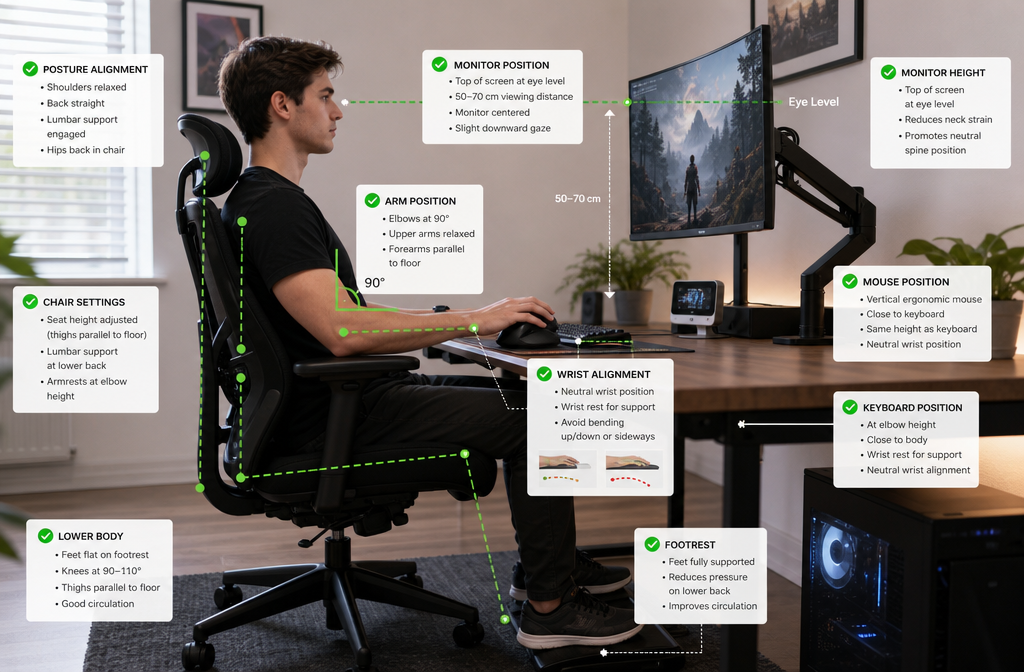
Proper gaming desk setup is the most important factor in preventing carpal tunnel syndrome in gamers. An optimized setup maintains neutral wrist position, reduces repetitive strain, and allows comfortable gaming for extended periods.
Desk height: Adjust your desk so that when you sit with your upper arms hanging vertically at your sides, your forearms are parallel to the floor with elbows at 90 degrees. Your wrists should be straight (neutral), not bent up or down. If your desk is not adjustable, adjust your chair height and use a footrest if needed to maintain proper positioning.
Chair selection and adjustment:
Monitor position: Place your monitor directly in front of you, about an arm's length away. The top of the screen should be at or slightly below eye level. This prevents neck strain that can affect shoulder and wrist position. For multi-monitor setups, position your primary monitor directly in front and secondary monitors at angles.
Keyboard placement: Position your keyboard directly in front of you, close enough that your elbows remain at 90 degrees. Keep the keyboard flat or use a negative-tilt keyboard tray. The keyboard should be at the same height as your elbows when your upper arms hang naturally. Consider a split or ergonomic keyboard that allows a more natural hand position.
Mouse placement: Place your mouse immediately beside your keyboard at the same height, close enough that you do not need to reach forward. Your elbow should remain at 90 degrees while using the mouse. Consider a large mouse pad that allows arm movements rather than just wrist movements.
Wrist rest considerations: If you use a wrist rest, choose a soft, rounded design that supports your palm, not your wrist. The wrist rest should keep your wrists in neutral position, not force extension. Better yet, support your forearms on armrests and keep your wrists floating above the desk.
Lighting: Ensure adequate lighting to prevent eye strain that causes you to lean forward and disrupt proper posture. Position lights to avoid glare on your monitor.
Cable management: Organize cables so they do not restrict mouse movement or create obstacles that force awkward positioning.
Footrest: If your feet do not rest flat on the floor when your desk and chair are properly adjusted, use a footrest to maintain proper leg position and prevent sliding forward in your chair.
Testing your setup: Sit in your gaming position and check these points:
Common setup errors:
Budget considerations: You do not need expensive equipment to achieve proper ergonomics. A simple desk height adjustment, proper chair positioning, and correct peripheral placement cost nothing but dramatically reduce injury risk. Invest in quality where it matters most: a good chair with full adjustability and a desk at the correct height.
Maintenance: Reassess your setup every few months. As you adjust your chair or move equipment, ergonomics can drift. Take photos of your optimal setup as a reference.
For more detailed guidance on ergonomic setup, see our guide to ergonomic tools for carpal tunnel prevention.
Can gaming cause permanent wrist damage?
Yes, untreated carpal tunnel syndrome from gaming can cause permanent median nerve damage, resulting in chronic numbness, weakness, and muscle atrophy in the hand. Early intervention with ergonomic changes, exercises, and medical treatment when needed prevents permanent damage in most cases.
How long should I take a break from gaming if I have carpal tunnel symptoms?
Take a complete break from gaming for 1-2 weeks if you develop acute carpal tunnel symptoms. During this time, implement ergonomic changes and begin exercises. Gradually return to gaming with strict time limits (30-60 minutes initially) and proper technique. If symptoms return, consult a doctor.
Is carpal tunnel syndrome covered by gaming insurance or esports contracts?
Professional esports contracts increasingly include health insurance and injury coverage, but policies vary widely. Some organizations cover carpal tunnel treatment as an occupational injury, while others do not. Review your specific contract or insurance policy for coverage details.
Can I prevent carpal tunnel if I game 8 hours a day?
Prevention is possible but requires strict adherence to ergonomic principles, mandatory breaks every hour, daily exercises, and excellent technique. Even with perfect prevention, gaming 8+ hours daily carries elevated risk. Consider whether this volume is sustainable long-term for your wrist health.
Do gaming gloves or compression sleeves prevent carpal tunnel?
No evidence supports gaming gloves or compression sleeves for carpal tunnel prevention. These products may provide warmth and minor support but do not address the underlying causes of median nerve compression. Proper ergonomics and technique are far more effective.
Will carpal tunnel surgery affect my gaming performance?
Most gamers return to their pre-surgery performance level or better after full recovery (8-12 weeks). Some report improved performance because they no longer experience numbness, weakness, or pain. Rushing return to gaming before full healing can compromise results.
Can I game with a wrist brace on?
Gaming with a wrist brace is generally not recommended because the brace restricts movement and can cause awkward compensatory motions. Use braces at night to prevent sleep-related wrist flexion, but address the underlying ergonomic and technique issues rather than relying on a brace during gaming.
Are mechanical keyboards better or worse for carpal tunnel?
Mechanical keyboards with light actuation force (45-50g) may reduce finger strain compared to membrane keyboards requiring heavier presses. However, keyboard type matters less than proper positioning, neutral wrist angle, and typing technique. Choose a keyboard that feels comfortable and allows neutral wrist position.
How do I know if my wrist pain is serious or just soreness?
Serious wrist pain from carpal tunnel includes numbness or tingling (especially at night), weakness when gripping, or symptoms lasting more than 2 weeks. Simple soreness improves with 1-2 days of rest and does not include numbness. When in doubt, consult a doctor.
Can stretching make carpal tunnel worse?
Gentle stretching and nerve glides performed correctly help carpal tunnel by maintaining flexibility and reducing inflammation. However, aggressive stretching, stretching through pain, or performing exercises incorrectly can worsen symptoms. Stretches should feel like gentle tension, never sharp pain.
Do professional gamers get carpal tunnel surgery?
Yes, several professional gamers have undergone carpal tunnel surgery and returned to competitive play. Surgery is often necessary when conservative treatment fails or symptoms are severe. With proper rehabilitation, most return to full competitive performance.
Is carpal tunnel syndrome a disability for gamers?
Severe carpal tunnel syndrome can qualify as a disability under certain circumstances, particularly if it prevents you from working or performing daily activities. For professional gamers, severe carpal tunnel might end a career if not treated promptly. Consult with a disability attorney for specific guidance on your situation.
Carpal tunnel syndrome in gamers is a preventable and treatable condition when addressed early with proper ergonomics, regular breaks, targeted exercises, and medical intervention when needed. The key to protecting your wrists lies in recognizing that gaming, like any repetitive activity, requires the same injury prevention strategies as traditional occupations.
Start by optimizing your gaming setup today. Ensure your desk height, chair position, and peripheral placement allow neutral wrist position with elbows at 90 degrees and shoulders relaxed. Implement mandatory breaks every hour, using that time to perform wrist stretches and nerve glides. If you game more than 3 hours daily, treat wrist care as a non-negotiable part of your routine.
Pay attention to early warning signs: nighttime numbness, tingling in your fingers, or weakness when gripping. These symptoms are your body's way of signaling that something needs to change. Do not ignore them or assume they will resolve on their own. Early intervention with conservative treatment prevents the progression to severe carpal tunnel requiring surgery.
If symptoms persist beyond two weeks despite ergonomic changes and exercises, consult a doctor promptly. Nerve conduction studies can determine the severity of your condition and guide treatment decisions. Mild to moderate carpal tunnel responds well to conservative treatment, but severe cases require surgical intervention to prevent permanent nerve damage.
For professional gamers and those pursuing esports careers, implement prevention strategies before symptoms appear. Your wrists are your most valuable asset, and protecting them ensures career longevity. Organizations and teams should prioritize player health with mandatory breaks, ergonomic assessments, and access to medical professionals.
Remember that carpal tunnel syndrome is not an inevitable consequence of gaming. With proper prevention, technique, and early intervention when needed, you can game comfortably for years without developing chronic wrist problems. Take action today to protect your wrists and ensure you can continue enjoying gaming long-term.
If you are experiencing persistent symptoms or need expert evaluation, consider consulting with board-certified surgeons specializing in carpal tunnel treatment who understand the unique needs of gamers and can provide comprehensive care from conservative treatment through surgical intervention if necessary.